I was greatly impressed by the icons presented at the site: http://www.istockphoto.com/file_search.php?action=file&s1=7802
I was just surfing and found an open source product that can generate the same kind.. just downloaded http://www.inkscape.org/ .. shd see what it can do
Saturday, August 18, 2007


Monday, July 23, 2007
Hey got the soln
Hi,
Got the solution. Initially i was not getting any exceptions and later i fine tuned the log4j.properties now i see exceptions in logs. After couple of trial and errors and fine tuning i see that... <..include file="" > does not work at all!
There is another approach to include the jspx files into each other; using facelets; i configured them and included all the files. now the JSTL works!
# logging icefaces
# Configure the logger to output info level messages into a rolling log file.
log4j.rootLogger=WARN, A1
log4j.appender.A1.File=../logs/mainLog.log
log4j.appender.A1=org.apache.log4j.FileAppender
log4j.appender.A1.layout=org.apache.log4j.PatternLayout
log4j.appender.A1.layout.ConversionPattern=%d [%t] %-5p %c - %m%n
log4j.logger.org.apache=WARN
log4j.logger.com.sun.faces=WARN
log4j.logger.javax.faces=WARN
log4j.logger.com.icesoft=WARN
# To see server side updates being sent to the browser
log4j.logger.blocking.dom.update=WARN
#LOGGING FACELETS;
facelets.level = FINEST
facelets.compiler.level = WARN
facelets.tag.component.level = INFO
facelets.viewhandler.level = WARN
& in JSPX:
http://facestutorials.icefaces.org/tutorial/dynamic-includes-tutorial.html
Got the solution. Initially i was not getting any exceptions and later i fine tuned the log4j.properties now i see exceptions in logs. After couple of trial and errors and fine tuning i see that
There is another approach to include the jspx files into each other; using facelets; i configured them and included all the files. now the JSTL works!
# logging icefaces
# Configure the logger to output info level messages into a rolling log file.
log4j.rootLogger=WARN, A1
log4j.appender.A1.File=../logs/mainLog.log
log4j.appender.A1=org.apache.log4j.FileAppender
log4j.appender.A1.layout=org.apache.log4j.PatternLayout
log4j.appender.A1.layout.ConversionPattern=%d [%t] %-5p %c - %m%n
log4j.logger.org.apache=WARN
log4j.logger.com.sun.faces=WARN
log4j.logger.javax.faces=WARN
log4j.logger.com.icesoft=WARN
# To see server side updates being sent to the browser
log4j.logger.blocking.dom.update=WARN
#LOGGING FACELETS;
facelets.level = FINEST
facelets.compiler.level = WARN
facelets.tag.component.level = INFO
facelets.viewhandler.level = WARN
& in JSPX:
http://facestutorials.icefaces.org/tutorial/dynamic-includes-tutorial.html
Wednesday, July 18, 2007
ICE Faces
we are now looking into the icefaces (ajax framework for JSF... looks hi-fi but simple one!) At first things were great... the custom components given by the site are really good... but as the things are goin by we see difficulties -as with any other open source product.
The first major once was with the file upload component. The component uploads all files to the same directory not allowing the user to choose which directory to upload. Hardly you have any freedom to customize the target location to save the file. Well, we could manage it with a workaround.
When observing the src code of icefaces, found that the upload component is being rendered in iframe, its calling a jsp page for which we write mapppings in jspx file. so the soln; wrote a filter which would intercept the url and push the file into the session. Later by another event in the jsp page we get the file from the session and stream it to the custom folder...
well this was simple 'cos we know how java works.... and by observation we can recognize the association btw files..... but the issue comes when the things are with configurations like installing JSTL into icefaces!
Going by manual, doing all entries dont help.. theres no error or stack trace which can give some clue... u need ot be sharlok homes.. trying to detect.... i have good knowledge abt the listeners filters, mappings but it does not seem to help :(
finally forums.... have to wait too long time to get a reply.. dont know what difficultites they have there :(
any how now we are stuck up with intalling JSTL into icefaces.... and i personally think having JSTL would add a lot of flexibility to the work that we do.
thats for now.. lets c how we fix the issue....!
The first major once was with the file upload component. The component uploads all files to the same directory not allowing the user to choose which directory to upload. Hardly you have any freedom to customize the target location to save the file. Well, we could manage it with a workaround.
When observing the src code of icefaces, found that the upload component is being rendered in iframe, its calling a jsp page for which we write mapppings in jspx file. so the soln; wrote a filter which would intercept the url and push the file into the session. Later by another event in the jsp page we get the file from the session and stream it to the custom folder...
well this was simple 'cos we know how java works.... and by observation we can recognize the association btw files..... but the issue comes when the things are with configurations like installing JSTL into icefaces!
Going by manual, doing all entries dont help.. theres no error or stack trace which can give some clue... u need ot be sharlok homes.. trying to detect.... i have good knowledge abt the listeners filters, mappings but it does not seem to help :(
finally forums.... have to wait too long time to get a reply.. dont know what difficultites they have there :(
any how now we are stuck up with intalling JSTL into icefaces.... and i personally think having JSTL would add a lot of flexibility to the work that we do.
thats for now.. lets c how we fix the issue....!
Sunday, May 6, 2007
appraisal
the appraisal season came and went off.... leaving us with little hike.... i was not happy at alll... went to the head and talked abt it to him... he was seeing at the% hike and i was seeing at the final figure... man it was bad...
i was terribly disappointed and shaken with the pay i am finally getting... then thought that i will do great this time... thought i shall study etc etc... but at the bottom i was feeling that i m making some fundamental mistakes...
i started observing all through and now finally feel that i need to change... at small things i m getting flared up.... loosing control... started some initiatives.... they seem to work //./ but they need to work more... i m loosing control and to the end i realize that i flared up! the good thing is that i m at least realizing... previously even this didn't happen...
things seem improving but they need to really improve more... this week i m thinking to remain silent.. thinking to observe more... know how others are behaving ... reacting... may be i get some interesting ways to mitigate my problem form them...
may god bless me :)
i was terribly disappointed and shaken with the pay i am finally getting... then thought that i will do great this time... thought i shall study etc etc... but at the bottom i was feeling that i m making some fundamental mistakes...
i started observing all through and now finally feel that i need to change... at small things i m getting flared up.... loosing control... started some initiatives.... they seem to work //./ but they need to work more... i m loosing control and to the end i realize that i flared up! the good thing is that i m at least realizing... previously even this didn't happen...
things seem improving but they need to really improve more... this week i m thinking to remain silent.. thinking to observe more... know how others are behaving ... reacting... may be i get some interesting ways to mitigate my problem form them...
may god bless me :)
Friday, March 2, 2007
Configuring GWT as a Eclipse web-project
HI,
I didn't find how to install GWT into eclipse. Finally I find a possible approach which i docmented as follows. May b its helpful, if not , feel free to get in touch with me.In this example i would create an application which finally makes an async call to server and fetches the time from there.
To the end we should be able to debug inline with eclipse editor. Here i use my-eclipse i think it works even with eclipse editor also. Its a simple applicatoin.
By the way, whats GWT? and documentation etc, i leave it to the home site of gwt.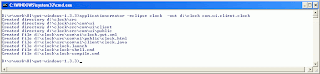
now by project creator,

create a web project, uncheck the default location, as below, and locate the sourece folder.
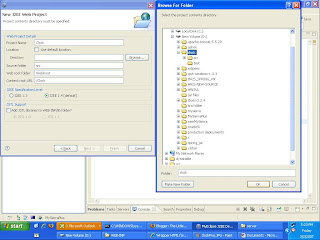
u should see the following in the navigator of eclipse

now the scene starts, when u run the gwt, in standalone mode, it creates www, bin folders and does the processings, but now need to make it create WebRoot and WebRoot/classes and use them instead. This requires editing of cmd files and here we go!
open compile cmd file as follows

Things are ready and deolpy the project onto tomcat server as exploed archive. Start the server, and try with this url:
URL: http://localhost:8080/Clock/com.ui.clock/clock.html
u should see the same clock as u saw in stand alone mode. Thats it.
I didn't find how to install GWT into eclipse. Finally I find a possible approach which i docmented as follows. May b its helpful, if not , feel free to get in touch with me.In this example i would create an application which finally makes an async call to server and fetches the time from there.
To the end we should be able to debug inline with eclipse editor. Here i use my-eclipse i think it works even with eclipse editor also. Its a simple applicatoin.
By the way, whats GWT? and documentation etc, i leave it to the home site of gwt.

now by project creator,

create a web project, uncheck the default location, as below, and locate the sourece folder.

u should see the following in the navigator of eclipse

now the scene starts, when u run the gwt, in standalone mode, it creates www, bin folders and does the processings, but now need to make it create WebRoot and WebRoot/classes and use them instead. This requires editing of cmd files and here we go!
open compile cmd file as follows

@java -cp "%~dp0\src;%~dp0\bin;D:/r/work/UI/gwt-windows-1.3.3/gwt-user.jar;D:/r/work/UI/gwt-windows-1.3.3/gwt-dev-windows.jar" com.google.gwt.dev.GWTCompiler -out "%~dp0\www" %* com.ui.clock
is what u see, now change
bin -> WebRoot\WEB-INF\classes
www -> WebRoot
To check if rpc is also working proceesd as follows:
create a new class as ClockInt.java
create the following interface
package com.ui.client;
public interface ClockInt extends RemoteService{
String getDate();
}
create the async interface as follows
package com.ui.client;
public interface ClockIntAsync {
}
The IDE may throw errors, for it u need to import the 3 jar files in gwt.xip that you have downloaded from the GWT home page and include them in eclipse properties (how? right click on project select properties, click on java build path, click on libraries tab, add external jars, and navigate to the 
 gwt-windows 1.3.3 -could be found when u unzip the gwt-windows 1.3.3 zip file from gwt home page. Select all the three jar files.)
The errors now disappear, if still not refresh the project.
Create the server side implimentation to the ClockInt as follows:
1. create the folder server at ui.com this results in com.ui.server package.
write the folloing code in the package
package com.ui.server;
import java.util.Date;
import com.google.gwt.user.server.rpc.RemoteServiceServlet;
import com.ui.client.ClockInt;
public class ClassImpl extends RemoteServiceServlet implements ClockInt {
public String getDate() {
Date today = new Date();
return today.toLocaleString();
}
}
update the clock.gwt.xml file as follows
<module>
<inherits name='com.google.gwt.user.User'/>
<entry-point class='com.ui.client.clock'/>
<servlet path="/Clock.rpc" class="com.ui.server.ClockImpl" />
module>
public class clock implements EntryPoint {
public void onModuleLoad() {
final Button button = new Button("Click me again");
final Label label = new Label();
ClockIntAsync clockAsync = (ClockIntAsync) GWT.create(ClockInt.class);
ServiceDefTarget endPoint = (ServiceDefTarget) clockAsync;
endPoint.setServiceEntryPoint("./Clock.rpc");
AsyncCallback asyncCallBack = new AsyncCallback() {
public void onSuccess(Object result) {
RootPanel.get().add(new HTML(result.toString()));
}
public void onFailure(Throwable ex) {
RootPanel.get().add(new HTML(ex.toString()));
}
};
clockAsync.getDate(asyncCallBack);
button.addClickListener(new ClickListener() {
public void onClick(Widget sender) {
if (label.getText().equals(""))
label.setText("Hello World!");
else
label.setText("");
}
});
RootPanel.get("slot1").add(button);
RootPanel.get("slot2").add(label);
}
}
Test the configuration in stand alone mode. Click on clock-compile.bat and then on clock-shell.bat successively. You should see the clock displayd to the bottom of page.
To deploy to webservr:
Make these entries:
<servlet>
<servlet-name>clockRPCservlet-name>
<servlet-class>com.ui.server.ClockImplservlet-class>
servlet>
<servlet-mapping>
<servlet-name>clockRPCservlet-name>
<url-pattern>/com.ui.clock/Clock.rpcurl-pattern>
Things are ready and deolpy the project onto tomcat server as exploed archive. Start the server, and try with this url:
URL: http://localhost:8080/Clock/com.ui.clock/clock.html
u should see the same clock as u saw in stand alone mode. Thats it.
references: http://www.oracle.com/technology/pub/articles/dubois-gwt.html?msgid=5128898
http://roberthanson.blogspot.com/2006/06/trivial-gwt-example.html
Sunday, February 11, 2007
Apache Tomcat Clustering
Apache Tomcat is a web-server, meaning it complies to JSP and Java-servlets spec given by Java. It is possible to cluster such servers and do load balancing on them. When i tried to do it, i hardly found any relevant help on it, now that i could get the clustering done, i thought thought that i would share this so that a new person can save a lot of time.
In discovering this approach the zip file provided by erricson @ http://www.ericsson.com/mobilityworld/sub/signup/login.html?oid=36443
was very helpful. I rec0mmend you get the download. It would speak about clustering all the tomcats under one umbrella of apache.
scenario 1:
But what if you want multiple clusters under one apache. For this you will have to proceed as follows.
1. Under/apache2.0/conf/workers.prop file: retain only the 'load balancer' parameter.
2. Say you have 4 workers (i.e. 4 tomcats, machine1.. machine 4) and you want machine1, machine2 into cluster a, and machine 3 & machine4 into cluster B then make the following changes in the workers.prop file
a. enter: worker.machine1.domain=A
worker.machine2.domain=A
worker.machine3.domain=B
worker.machine4.domain=D
Scenario 2:
Supposing that you need the request to be always server to the same server which served the first request from the browzer then:
../conf/workers.properties : make worker.loadbalancer.sticky_session=true
With scenario 1 + scenario2 done, you have achieved fail save mechanism. i.e. if the server of a cluster fails, then the neighboring servers of the same cluster take care of the request.
my state:
Right now i could make 1-cluster & a stand-alone tomcat servers, under one apache HTTP server. I shall update the site in-case i get any issues & how to rectify them.
In discovering this approach the zip file provided by erricson @ http://www.ericsson.com/mobilityworld/sub/signup/login.html?oid=36443
was very helpful. I rec0mmend you get the download. It would speak about clustering all the tomcats under one umbrella of apache.
scenario 1:
But what if you want multiple clusters under one apache. For this you will have to proceed as follows.
1. Under
2. Say you have 4 workers (i.e. 4 tomcats, machine1.. machine 4) and you want machine1, machine2 into cluster a, and machine 3 & machine4 into cluster B then make the following changes in the workers.prop file
a. enter: worker.machine1.domain=A
worker.machine2.domain=A
worker.machine3.domain=B
worker.machine4.domain=D
Scenario 2:
Supposing that you need the request to be always server to the same server which served the first request from the browzer then:
../conf/workers.properties : make worker.loadbalancer.sticky_session=true
With scenario 1 + scenario2 done, you have achieved fail save mechanism. i.e. if the server of a cluster fails, then the neighboring servers of the same cluster take care of the request.
my state:
Right now i could make 1-cluster & a stand-alone tomcat servers, under one apache HTTP server. I shall update the site in-case i get any issues & how to rectify them.
Saturday, December 9, 2006
Search!
Today i was not in a mood to do any thing.... 'cos i couldnt do well yesturday... yesturday was my dream day... i couldnt perform well... not even to average extent.... he asked me all questions related to data structures...
i am a mechanical guy... i love gears, 4bar mechanisms, light, metallurgy... and he was asking me about data structures... some trees... i had a basic knowledge of it... but he was too deep into it.... finally he gave me a bad comment... and it was this comment that pinched rather the fact that i could not perform.
any how... my friend said that he could arrange me it again another day... and this time i would definitely win it.
i am a mechanical guy... i love gears, 4bar mechanisms, light, metallurgy... and he was asking me about data structures... some trees... i had a basic knowledge of it... but he was too deep into it.... finally he gave me a bad comment... and it was this comment that pinched rather the fact that i could not perform.
any how... my friend said that he could arrange me it again another day... and this time i would definitely win it.
My Favorites
My love to ‘sayings’ is immense. I love collecting them as I often remember them in life…. Some of my most memorable once are…
Light at the end of the tunnel could be an approaching train.
Subscribe to:
Posts (Atom)